
Trong thế giới phát triển microservices bằng Java, Spring Boot là lựa chọn phổ biến nhờ tính dễ sử dụng và hệ sinh thái phong phú. Tuy nhiên, khi cần tối ưu hiệu suất, footprint nhỏ, và khả năng khởi động nhanh, Helidon xuất hiện như một framework nhẹ, hiện đại, được thiết kế đặc biệt cho cloud-native microservices.
Trong bài viết này, tôi sẽ giải thích Helidon là gì, điểm mạnh của nó, và hướng dẫn cách chuyển đổi một dự án Spring Boot sang Helidon bằng cách sử dụng AI, dựa theo kinh nghiệm triển khai thực tế.
1. Helidon là gì?
1.1. Giới thiệu tổng quan
Helidon là một bộ công cụ Java microservices do Oracle phát triển, tập trung vào hiệu suất, tính gọn nhẹ và khả năng triển khai linh hoạt. Helidon cho phép xây dựng ứng dụng cloud-native theo chuẩn Jakarta EE, MicroProfile hoặc theo kiểu lập trình phản ứng
1.2. Hai “flavor” của Helidon: SE và MP
Helidon SE: Lập trình thủ công theo style functional, phù hợp với ứng dụng hiệu suất cao, yêu cầu kiểm soát chi tiết.
Helidon MP: Tuân theo chuẩn MicroProfile, tương thích quen thuộc với mô hình enterprise Java (JAX-RS, CDI, Metrics, Config). Đây là lựa chọn gần nhất với Spring Boot.
1.3. Những điểm nổi bật
- Khởi động nhanh và sử dụng ít tài nguyên.
- Thiết kế dành cho microservices và cloud-native.
- Tích hợp tốt các tiêu chuẩn Jakarta & MicroProfile.
- Cấu hình đơn giản, dễ triển khai.
1.4. Môi trường và khả năng tích hợp
Helidon hoạt động tốt trong môi trường container, Kubernetes, hỗ trợ OpenTelemetry, GraalVM và dễ kết nối với các dịch vụ bên ngoài như databases, messaging hoặc service mesh.
2. Tại sao nên cân nhắc chuyển từ Spring Boot sang Helidon
2.1. Hiệu suất và footprint
Helidon có footprint nhỏ hơn Spring Boot và thời gian khởi động nhanh, phù hợp cho scaling tự động và serverless.
2.2. Microservices và khả năng quan sát
MicroProfile mang theo sẵn metrics, health check, config và fault tolerance, giúp theo dõi và vận hành dịch vụ rõ ràng hơn.
2.3. Native-image với GraalVM
Helidon hỗ trợ native-image tốt, mang lại tốc độ khởi động gần tức thì và giảm tối đa tiêu thụ CPU/RAM.
2.4. Lợi thế khi dùng AI
AI giúp tự động chuyển đổi mã, giảm sai sót, tăng tốc độ refactor và đồng bộ hóa kiến trúc từ Spring Boot sang Helidon.

3 Chuyển đổi Spring Boot sang Helidon bằng AI
3.1 Tạo Workspace chuyển đổi
Mở Terminal và chạy:
mkdir spring-to-helidon
cd spring-to-helidon
Thư mục này sẽ chứa toàn bộ converter và output chuyển đổi.
3.2 Clone dự án spring boot mẫu
Chúng ta sử dụng Spring Petclinic để làm mẫu (bạn có thể thay bằng dự án của bạn).
git clone https://github.com/spring-projects/spring-petclinic.gitCấu trúc được tạo:
spring-to-helidon/
 └── spring-petclinic/
3.3 Tạo bộ CONVERTER AI
mkdir converter
cd converter
mkdir prompts
mkdir output
Trong đó :
- prompts/ → chứa các prompt hướng dẫn AI convert
- output/ → nơi lưu file đã chuyển đổi
3.4 Tạo prompt chuyển đổi chuyên biệt cho từng loại File
Mỗi loại file cần một hướng dẫn riêng để AI convert chính xác.
3.4.1 Prompt cho Controller
nano prompts/controller.txtYou are converting a Spring Boot REST Controller to a Helidon MP JAX-RS resource.
Rules:
- Replace @RestController with @Path and @ApplicationScoped.
- Replace @GetMapping, @PostMapping, @PutMapping, @DeleteMapping with @GET, @POST, @PUT, @DELETE.
- Replace @Autowired with @Inject (CDI).
- Remove all Spring imports.
- Keep logic unchanged.
- Output FULL source file.3.4.2 Prompt cho Service
nano prompts/service.txtConvert Spring Service into CDI bean for Helidon MP.
Rules:
- Replace @Service with @ApplicationScoped.
- Replace @Autowired with @Inject.
- Remove Spring imports.
- Output full file.3.4.3 Prompt cho Repository
nano prompts/repo.txtConvert a Spring Data repository to a Helidon MP-compatible JPA repository.
Rules:
- Remove Spring Data interfaces.
- Replace query methods (findBy…) with JPQL.
- Use @ApplicationScoped and @Inject.
- Output full file.3.4.4 Prompt cho Entity
nano prompts/entity.txtConvert a Spring JPA Entity into Helidon MP Entity using Jakarta Persistence.
Rules:
- Keep @Entity, @Id, @GeneratedValue.
- Remove Lombok annotations.
- Replace org.springframework imports with jakarta.
- Output full file.3.4.5 Prompt cho pom.xml
nano prompts/pom.txtConvert Spring Boot pom.xml to Helidon MP pom.xml.
Replace:
- spring-boot-starter-* with helidon-microprofile modules
- Use jakarta dependencies
Return a valid Maven pom.xml3.5 Tạo script phân loại file (classifier)
AI cần biết:
→ file nào là Controller?
→ Service?
→ Repository?
→ Entity?
3.5.1 Tạo file classify.py
nano classify.pyCode:
import os

def classify(path):
    text = open(path).read()

    if path.endswith("pom.xml"):
        return "pom"

    if "@RestController" in text:
        return "controller"

    if "JpaRepository" in text or "CrudRepository" in text:
        return "repo"

    if "@Service" in text or "@Component" in text:
        return "service"

    if "@Entity" in text:
        return "entity"

    return "java"

if __name__ == "__main__":
    base_dir = "../spring-petclinic"

    for root, dirs, files in os.walk(base_dir):
        for file in files:
            if file.endswith(".java") or file.endswith("pom.xml"):
                path = os.path.join(root, file)
                ftype = classify(path)
                print(f"{path}:{ftype}")
Chạy để test:
python3 classify.py3.6 Script gọi OpenAI và chuyển đổi code
3.6.1 Export key
Sau đó:
export OPENAI_API_KEY="YOUR_API_KEY"3.6.2 Tạo convert.py
nano convert.pyCode:
import os
from openai import OpenAI
from concurrent.futures import ThreadPoolExecutor, as_completed
from threading import Lock
import time
from datetime import datetime

# Support multiple API providers via environment variables
# Default to Ollama if available, otherwise use DeepSeek
api_key = (os.getenv("OPENAI_API_KEY") or "").strip()
base_url = (os.getenv("OPENAI_BASE_URL") or "").strip()
model_name = os.getenv("MODEL_NAME", "").strip()

# Auto-detect Ollama if not explicitly set
if not base_url:
    # Check if Ollama is running
    import socket
    try:
        sock = socket.socket(socket.AF_INET, socket.SOCK_STREAM)
        sock.settimeout(1)
        result = sock.connect_ex(('localhost', 11434))
        sock.close()
        if result == 0:
            # Ollama is running, use it as default
            base_url = "http://localhost:11434/v1"
            model_name = model_name or "llama3"
            api_key = api_key or "ollama"
            print("ℹ Auto-detected Ollama, using it as default")
    except:
        pass

    # Fallback to DeepSeek if Ollama not available
    if not base_url:
        base_url = "https://api.deepseek.com"
        model_name = model_name or "deepseek-chat"
        if not api_key:
            print("⚠ Warning: Using DeepSeek default. Set OPENAI_API_KEY for Ollama or other providers.")

if not api_key:
    raise ValueError("OPENAI_API_KEY environment variable is not set")

client = OpenAI(
    api_key=api_key,
    base_url=base_url
)

PROMPTS = {
    "controller": "prompts/controller.txt",
    "repo": "prompts/repo.txt",
    "service": "prompts/service.txt",
    "entity": "prompts/entity.txt",
    "pom": "prompts/pom.txt",
    "java": "prompts/entity.txt"  # fallback
}

# Thread-safe counters for progress tracking
success_lock = Lock()
error_lock = Lock()
progress_lock = Lock()
success_count = 0
error_count = 0
completed_count = 0
start_time = None

def print_progress(completed, total, current_file=None):
    """Print progress with percentage and time estimate"""
    global start_time
    if total == 0:
        return

    percentage = (completed / total) * 100
    elapsed = time.time() - start_time if start_time else 0

    if completed > 0 and elapsed > 0:
        avg_time = elapsed / completed
        remaining = total - completed
        eta_seconds = avg_time * remaining
        eta_str = f"ETA: {int(eta_seconds//60)}m {int(eta_seconds%60)}s"
    else:
        eta_str = "Calculating..."

    elapsed_str = f"{int(elapsed//60)}m {int(elapsed%60)}s"

    bar_length = 30
    filled = int(bar_length * completed / total)
    bar = "█" * filled + "░" * (bar_length - filled)

    status = f"[{bar}] {completed}/{total} ({percentage:.1f}%) | {elapsed_str} elapsed | {eta_str}"
    if current_file:
        filename = os.path.basename(current_file)
        status += f" | Processing: {filename}"

    print(f"\r{status}", end="", flush=True)


def convert(path, ftype, max_retries=3):
    file_start_time = time.time()
    prompt = open(PROMPTS[ftype]).read()
    code = open(path).read()

    # Calculate dynamic timeout based on file size
    # Base timeout: 60s, add 2s per KB of code
    code_size_kb = len(code) / 1024
    base_timeout = 60
    dynamic_timeout = int(base_timeout + (code_size_kb * 2))
    # Cap at 10 minutes for very large files
    timeout = min(dynamic_timeout, 600)

    messages = [
        {"role": "system", "content": prompt},
        {"role": "user", "content": code},
    ]

    last_error = None
    for attempt in range(max_retries):
        try:
            # Add small delay between retries
            if attempt > 0:
                wait_time = min(2 ** attempt, 10)  # Exponential backoff, max 10s
                time.sleep(wait_time)
                print(f"  ↻ Retry {attempt}/{max_retries-1} for {os.path.basename(path)}...")

            # Call API (supports multiple providers)
            result = client.chat.completions.create(
                model=model_name,
                temperature=0,
                messages=messages,
                timeout=timeout
            )

            output = result.choices[0].message.content

            # Tạo file output theo cấu trúc map
            out_path = "output/" + path.replace("../spring-petclinic/", "")
            os.makedirs(os.path.dirname(out_path), exist_ok=True)
            with open(out_path, "w") as f:
                f.write(output)

            elapsed = time.time() - file_start_time
            return True, elapsed
        except Exception as e:
            last_error = e
            error_msg = str(e)
            # If it's not a timeout, don't retry
            if "timeout" not in error_msg.lower() and "timed out" not in error_msg.lower():
                elapsed = time.time() - file_start_time
                return False, elapsed, error_msg
            # For timeout, continue to retry

    # All retries failed
    elapsed = time.time() - file_start_time
    return False, elapsed, str(last_error)


def convert_with_counter(path, ftype, total, skip_existing=True):
    global success_count, error_count, completed_count

    # Check if output file already exists
    if skip_existing:
        out_path = "output/" + path.replace("../spring-petclinic/", "")
        if os.path.exists(out_path) and os.path.getsize(out_path) > 0:
            with progress_lock:
                completed_count += 1
                success_count += 1
                filename = os.path.basename(path)
                print(f"\n⊘ [{completed_count}/{total}] {filename} (skipped - already exists)")
                print_progress(completed_count, total)
            return True

    result_data = convert(path, ftype)

    if len(result_data) == 2:
        success, elapsed = result_data
        error_msg = None
    else:
        success, elapsed, error_msg = result_data

    with progress_lock:
        completed_count += 1

        if success:
            success_count += 1
            status = "✔"
        else:
            with error_lock:
                error_count += 1
            status = "✗"

        # Print detailed result on new line
        filename = os.path.basename(path)
        if success:
            print(f"\n{status} [{completed_count}/{total}] {filename} ({elapsed:.1f}s)")
        else:
            if error_msg:
                if "402" in error_msg or "Insufficient Balance" in error_msg:
                    print(f"\n{status} [{completed_count}/{total}] {filename} - Insufficient Balance")
                elif "401" in error_msg or "Unauthorized" in error_msg:
                    print(f"\n{status} [{completed_count}/{total}] {filename} - Invalid API key")
                elif "timeout" in error_msg.lower():
                    print(f"\n{status} [{completed_count}/{total}] {filename} - Timeout ({elapsed:.1f}s)")
                else:
                    print(f"\n{status} [{completed_count}/{total}] {filename} - Error: {error_msg[:50]}")
            else:
                print(f"\n{status} [{completed_count}/{total}] {filename} - Failed")

        # Update progress bar
        print_progress(completed_count, total)

    return success


# Cho phép chạy convert thủ công
if __name__ == "__main__":
    import sys

    print(f"Using API: {base_url}")
    print(f"Using model: {model_name}")
    print()

    if len(sys.argv) == 3:
        result_data = convert(sys.argv[1], sys.argv[2])
        if len(result_data) == 2:
            success, elapsed = result_data
            if success:
                print(f"✔ Converted in {elapsed:.1f}s")
            else:
                print(f"✗ Failed in {elapsed:.1f}s")
        else:
            success, elapsed, error_msg = result_data
            print(f"✗ Error: {error_msg}")
    else:
        success_count = 0
        error_count = 0
        completed_count = 0
        start_time = time.time()

        # Parse file list
        tasks = []
        with open("file-list.txt", "r") as f:
            for line in f:
                line = line.strip()
                if not line:
                    continue
                # Support both formats: "path:type" and "path type"
                if ":" in line:
                    parts = line.split(":", 1)
                else:
                    parts = line.rsplit(None, 1)  # Split on last whitespace

                if len(parts) == 2:
                    path, ftype = parts
                    path = path.strip()
                    ftype = ftype.strip()
                    tasks.append((path, ftype))
                else:
                    print(f"⚠ Skipped invalid line: {line[:50]}...")

        total = len(tasks)
        # Reduce default workers to avoid overwhelming Ollama
        # Ollama can be slow with too many concurrent requests
        max_workers = int(os.getenv("MAX_WORKERS", "2"))

        print(f"Found {total} files to convert")
        print(f"Using {max_workers} parallel workers (reduce if getting timeouts)")
        print(f"Timeout: 60s base + 2s per KB (max 10min)")
        print(f"Retries: 3 attempts per file")
        print(f"Started at {datetime.now().strftime('%H:%M:%S')}\n")

        # Initialize progress bar
        print_progress(0, total)

        # Use ThreadPoolExecutor for parallel processing
        # Add small delay between submissions to avoid overwhelming the API
        with ThreadPoolExecutor(max_workers=max_workers) as executor:
            futures = []
            for idx, (path, ftype) in enumerate(tasks):
                future = executor.submit(convert_with_counter, path, ftype, total)
                futures.append(future)
                # Small delay to avoid overwhelming Ollama
                if idx < len(tasks) - 1:
                    time.sleep(0.5)

            # Wait for all tasks to complete
            for future in as_completed(futures):
                try:
                    future.result()
                except Exception as e:
                    with progress_lock:
                        completed_count += 1
                        error_count += 1
                        print(f"\n✗ Unexpected error: {e}")
                        print_progress(completed_count, total)

        # Final summary
        total_time = time.time() - start_time
        print(f"\n\n{'='*60}")
        print(f"Summary:")
        print(f"  ✓ Succeeded: {success_count}")
        print(f"  ✗ Failed:    {error_count}")
        print(f"  ⏱ Total time: {int(total_time//60)}m {int(total_time%60)}s")
        if success_count > 0:
            avg_time = total_time / success_count
            print(f"  📊 Avg time/file: {avg_time:.1f}s")
        print(f"{'='*60}")
3.7 Chạy chuyển đổi
3.7.1 Xuất danh sách file cần convert
python3 classify.py > file-list.txt3.7.2 Chạy convert tự động toàn bộ project
python3 convert.pyKết quả sẽ được lưu ở :
converter/output/3.8 Tạo project helidon và ghép code
Tạo Helidon MP project:
cd ..
mvn archetype:generate -DinteractiveMode=false \
-DarchetypeGroupId=io.helidon.archetypes \
-DarchetypeArtifactId=helidon-mp
Sau đó copy code đã chuyển đổi vào project Helidon.
mvn package
java -jar target/*.jar
3.9 Kết quả
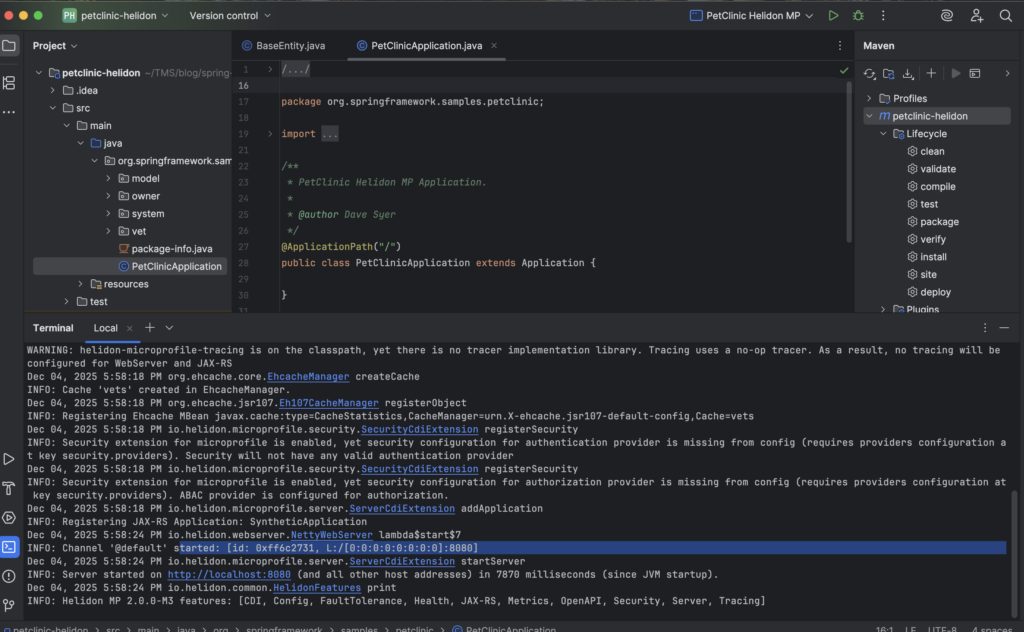
4. Kết luận
AI chắc chắn đang trở thành một phần cốt lõi trong cuộc sống của chúng ta, làm thay đổi cách chúng ta tiếp cận lập trình. Nhiệm vụ chuyển đổi một dự án từ framework này sang framework khác vốn phức tạp giờ đây đã trở nên dễ dàng hơn rất nhiều với sự trợ giúp của AI, giúp tiết kiệm thời gian và tài nguyên, đồng thời mang lại hiệu quả chi phí cao.
Tuy nhiên, các bộ chuyển đổi này không chỉ giới hạn ở việc chuyển đổi Spring sang Helidon. Với bộ gợi ý phù hợp, chúng cũng có thể hỗ trợ việc chuyển đổi và di chuyển các dự án Java EE cũ dựa trên javax.* sang Jakarta EE hiện đại.
Tôi dự định sẽ tiếp tục cải thiện các bộ chuyển đổi. Như thường lệ, tôi hoan nghênh phản hồi của bạn, dù là trong phần bình luận hay trên mạng xã hội.
Dưới đây là các liên kết đến các dự án GitHub được đề cập trong bài viết này:
- Spring Pets – Một dự án thử nghiệm được sử dụng để kiểm tra chuyển đổi
- Bộ chuyển đổi theo ngữ cảnh
- Bộ chuyển đổi gia tăng


1 comment
Can you be more specific about the content of your article? After reading it, I still have some doubts. Hope you can help me. https://accounts.binance.info/en-ZA/register?ref=B4EPR6J0